
- Reinstalled Signal? Steps to refresh group information for your device.
- How do I create a New Group? It still shows a Legacy Group.
- How do I add someone to a New Group? It still shows a Legacy Group.
- Why can't my contact accept my group invitation?
- Why can't I accept a group invite?
- How do I upgrade to a New Group?
- How do I upgrade an existing group?
- Why does it say Couldn't Complete Upgrade?
- What do other people see when the group is upgraded?
- Who is the admin of the group?
- How do I set others as admin?
- What if I do not see the options to edit a group name, photo, or members?
See also:
Reinstalled Signal? Steps to refresh group information for your device.
- Update to the latest version of Signal.
- Open a one-on-one chat with another member of the group.
- Ask this member to update to the latest version.
- Ask this member to then send a couple of messages in the group or to update the group name or photo from their phone.
How do I create a New Group? I don't see any new options or it shows a Legacy Group banner.
- Update to the latest version on your phone and all of your linked devices.
- Suggestion: Unlink any devices you no longer use. Review your list of linked devices: on your phone, tap your profile
 > Settings (iOS only) > Linked Devices.
- Create a group.
- Tap Learn More to see which of your contacts need to update to the latest version on their phone and all of their linked devices.
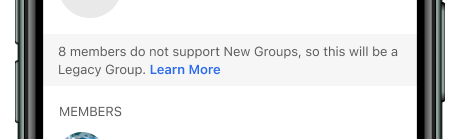
How do I add someone to a New Group? It still shows a Legacy Group.
- Ask your contact to update to the latest version on their phone and all of their linked devices.
- Follow steps to edit the group.
Why can't my contact accept my group invitation?
- Ask your contact to update to the latest version on their phone and all of their linked devices.
- Ask your contact to set or refresh their Signal profile.
Why can't I accept a group invite?
- Update to the latest version on your phone and all of your linked devices. Alternatively, you can unlink or remove all your linked devices.
- Set or refresh your Signal profile.
How do I upgrade to a New Group?
You can create a new group or wait for the banner in your Legacy group to ask you to upgrade.
- Update to the latest version on your phone and all of your linked devices.
- In Signal, tap compose
 or
 then New Group and select up to 1000 contacts.
- Tap
 or Next and set a Group name.
- If a banner for a Legacy Group appears, tap Learn More to see which contacts are using an old version of Signal. Remove these contacts to create a New Group.
- Tap Create.
- A member may need to accept the message request or invitation before they can message in the group.
How do I upgrade an existing group?
- Open the Legacy group chat.
- If prompted, share your Signal profile with the group.
- Tap Continue.
- Tap Upgrade this Group.
Why does it say Couldn't Complete Upgrade?
- You are no longer a member of the group.
What do other people see when the group is upgraded?
- They may be added to or invited to the group if the legacy group was no longer in their chat list.
- They may see a message request for the group if the legacy group was in their chat list at the time.
- The chat updates the timestamp when it is upgraded.
- The chat appears with the new timestamp in the inbox view.
Who is the admin of the group?
- Open your group chat and tap on the group name to view chat settings.
- Scroll to the Members list.
- Tap View all members to see the full list of group members.
- Admin will appear by anyone that is an administrator of the group.
How do I set others as admin?
- Open your group chat and tap on the group name to view chat settings.
- Tap View all members to see the full list of group members.
- Tap on the contact name.
- Tap
 Make Admin.
- Tap Make Admin to confirm.
What if I do not see the options to edit a group name, photo, or members?
- Admins may choose who can modify the group info and view pending group info. Message the admin and request this change.